
Introduction
The Developer Package provides everything needed to use the VEE Wear Framework, enabling developers to explore its capabilities, build custom applications, and validate them on supported targets.
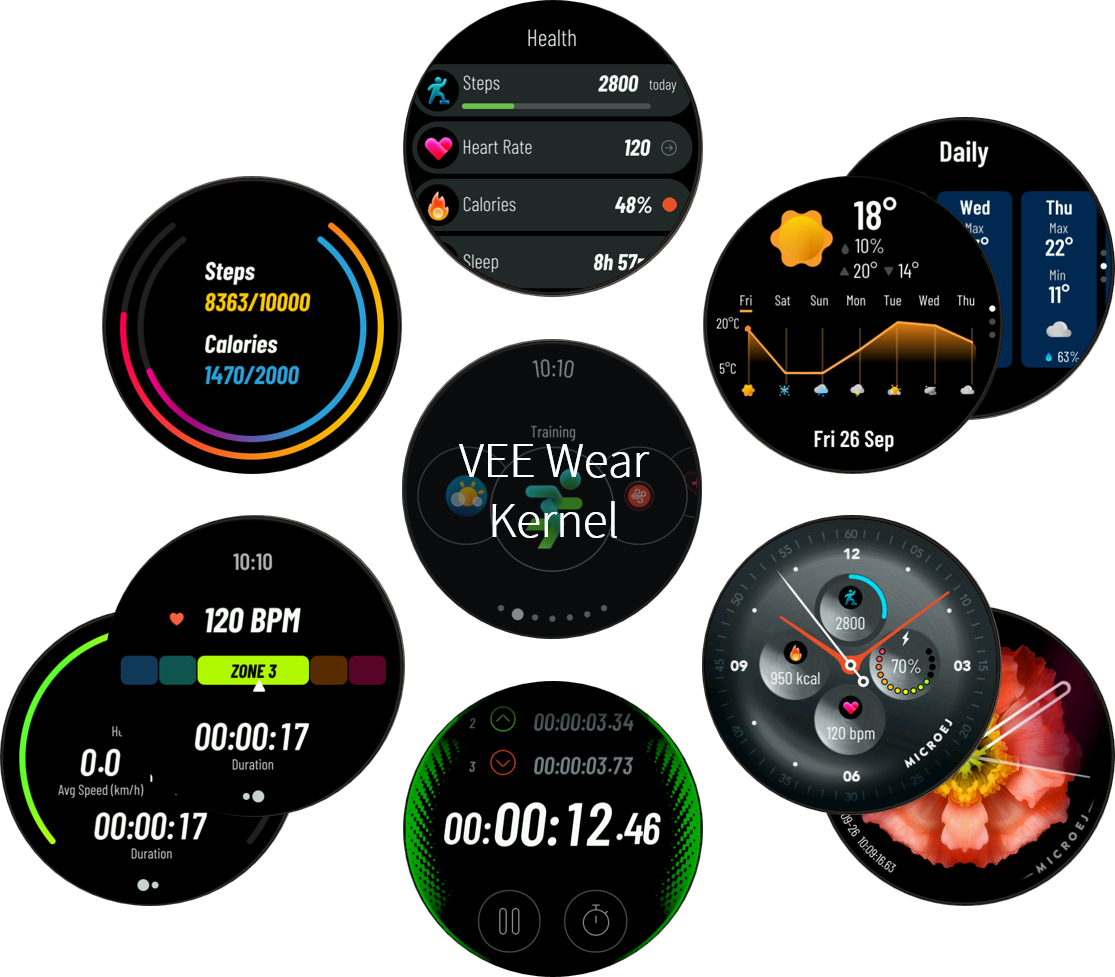
VEE Wear Kernel and sample applications
The video below illustrates the user interface and navigation experience within the application. It showcases key interactions, gestures, and transitions, demonstrating how the user can navigate between watchfaces and applications.
Terms and Definitions
Multi-Sandbox VEE Port: a VEE Port with the Multi-Sandbox capability of the Core Engine enabled.
Kernel: a Kernel is the main application that defines the core functionality of the system. It can be extended by “Features”.
Feature: a Feature is an application “extension” managed by the Kernel. It can be installed, started, stopped and uninstalled.
Mock: a Mock is a jar file containing the Java classes that simulate natives for the Simulator.
Virtual Device: a Virtual Device includes the same MicroEJ Core, libraries, and pre-installed Applications as the real device. The Virtual Device allows developers to run their applications on the Simulator.
Please refer to the official glossary for more details.
Intended Audience
This package is designed for developers and system architects who plan to design and build their own wearable software solution using VEE Wear.
This document assumes that the reader is familiar with MICROEJ SDK and MICROEJ VEE (see our Getting Started) and specifics of developing Multi-Sandbox Applications (see our training for Multi-Sandbox Applications). The reader is also encouraged to refer to the official documentation, as not all topics are covered in this documentation.
For a quick overview of a smartwatch application without setting up the development environment, the package provides a Virtual Device, and a prebuilt executable. These resources allow readers to explore the application’s behavior and features with minimal setup.
Developer Package Content
This developer package consists of those main components:
Kernel – The Kernel Application defining the system core behavior, including app management, services to apps, navigation, connectivity, and more.
VEE Port for ACTIONS ATS3085S EVK – The Multi-Sandbox VEE Port used to build the Kernel for the Actions ATS3085S EVK board.
Mock – The Mock project that contains Java classes which simulate natives for the Simulator.
Application Samples – Example applications demonstrating typical smartwatch use cases running on the Kernel.
Facer Application – The Facer watch application.
Companion App – A mobile companion application for smartwatch interaction.
Module Repository - The Offline Repository containing the dependencies required by the framework.
The source code for most of these components is provided, allowing for testing and modification.
Package Structure
The package is structured as follows:
├── bin/
│   ├── application.out                          # Smartwatch executable for ATS3085S
│   ├── virtualDevice.zip                        # Smartwatch Virtual Device
│   ├── wear-companion-app-x.y.z.apk             # Companion mobile application APK for Android
├── doc/
│   ├── index.html                               # The entry point of the documentation
├── repository/                                  # Offline Repository containing VEE Wear dependencies
├── src/
│   ├── ats3085s-veeport                         # VEE Port sources
│   ├── wear-companion                           # Companion mobile application sources
│   ├── wear-facer-app                           # Facer watch app sources
│   ├── wear-samples                             # Application samples sources
│   ├── wear-kernel                              # Kernel sources
│   ├── wear-mock                                # Mock sources
Virtual Device Executable
The package includes a prebuilt Virtual Device, providing a ready-to-use executable for running the simulated application. This allows for easy testing and demonstration without requiring the development environment.
Unzip the archive
bin/virtualDevice.zip,Launch the Virtual Device by using the launcher script that matches your OS (
launcher-<os>.(bat│sh)).
The Virtual Device can also be built directly from the sources. Refer to the section Run the application on the Virtual Device for more information.
Device Executable
To allow quick testing on the real device, the package also includes a ready-to-use executable (bin/application.out).
Before proceeding, please make sure that the Actions ATS3058S board is set up and ready (see Hardware Setup).
To program the device, use the Run script that matches your OS (bin/run.(bat│sh)).
Software Architecture
Below is a high-level diagram illustrating the dependencies between the components:
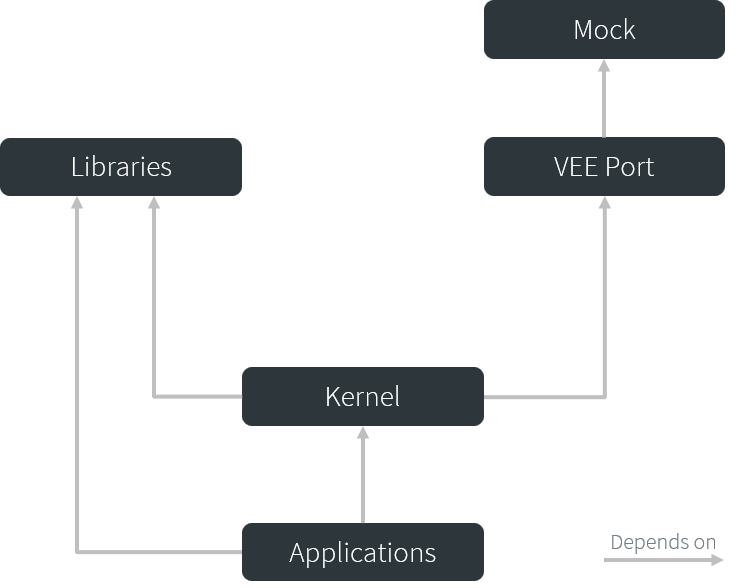
Components dependency graph
The next diagram presents a more detailed view of a typical VEE Wear smartwatch architecture:
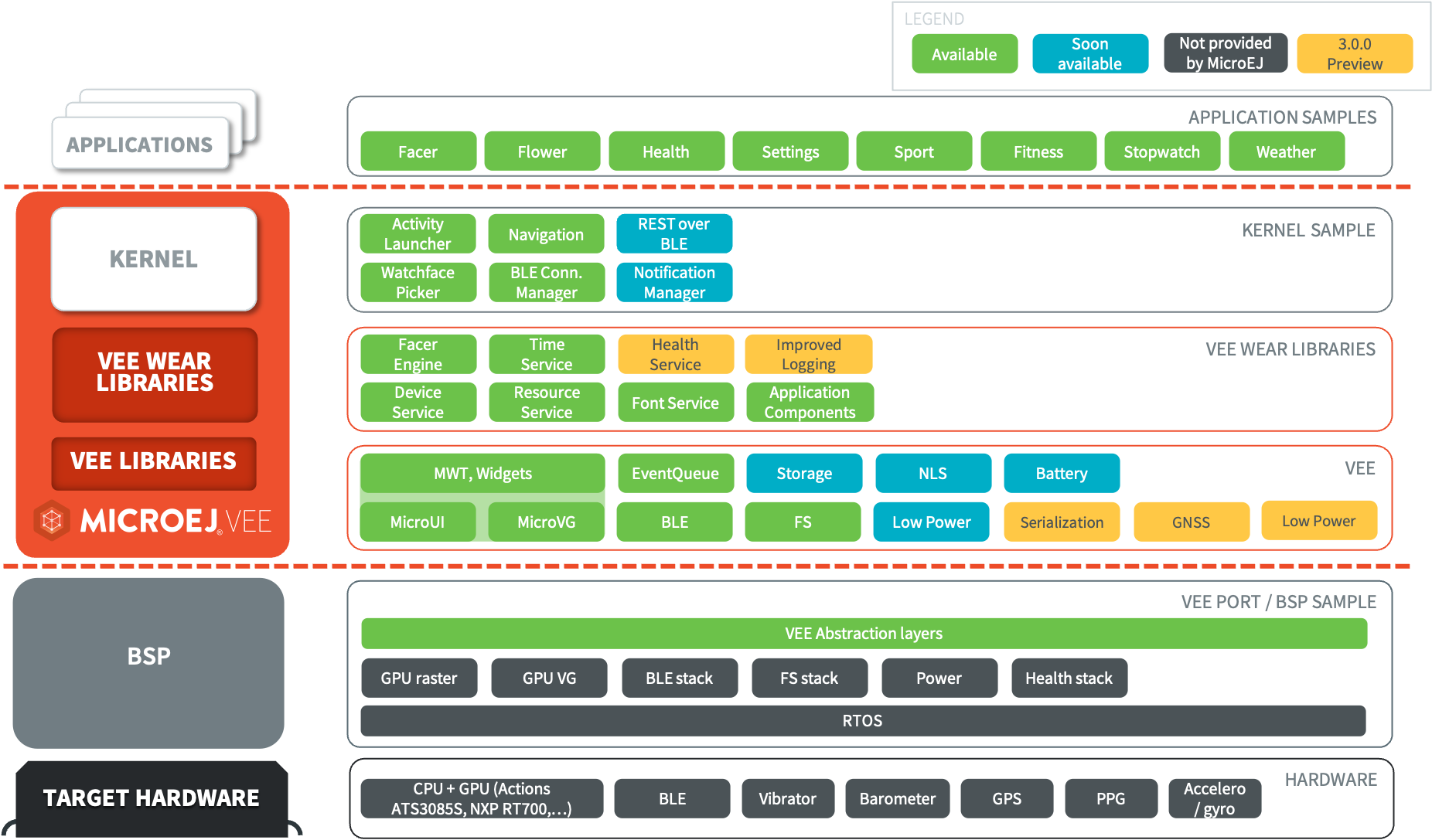
Typical Smartwatch Software Architecture
VEE Wear accelerates application development through standardized API for interacting with the user, the smartphone, sensors, and storage memory. The following diagram shows most of those interactions.
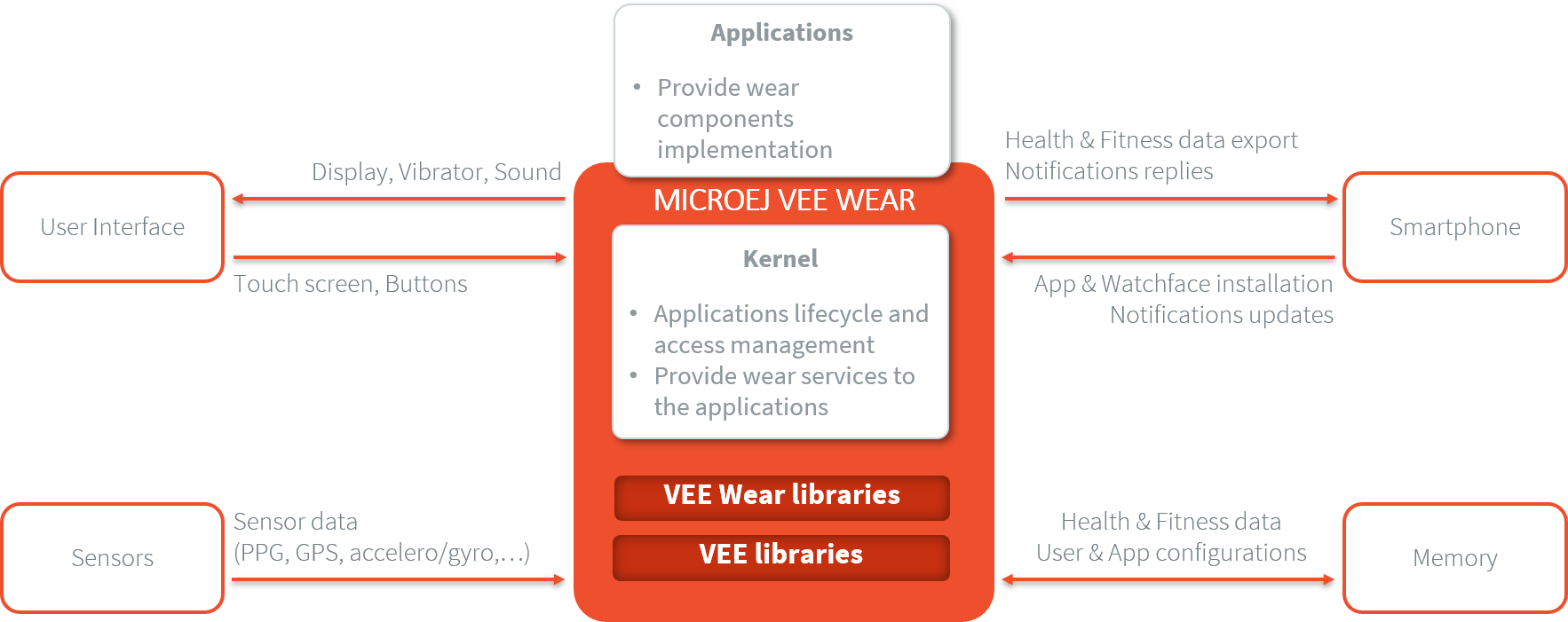
Inputs/Outputs of the VEE Wear system
Supported Hardware
VEE Wear runs and can be adapted to a wide range of hardware, this package demonstrates its use with the Actions ATS3085S EVK as the target device.
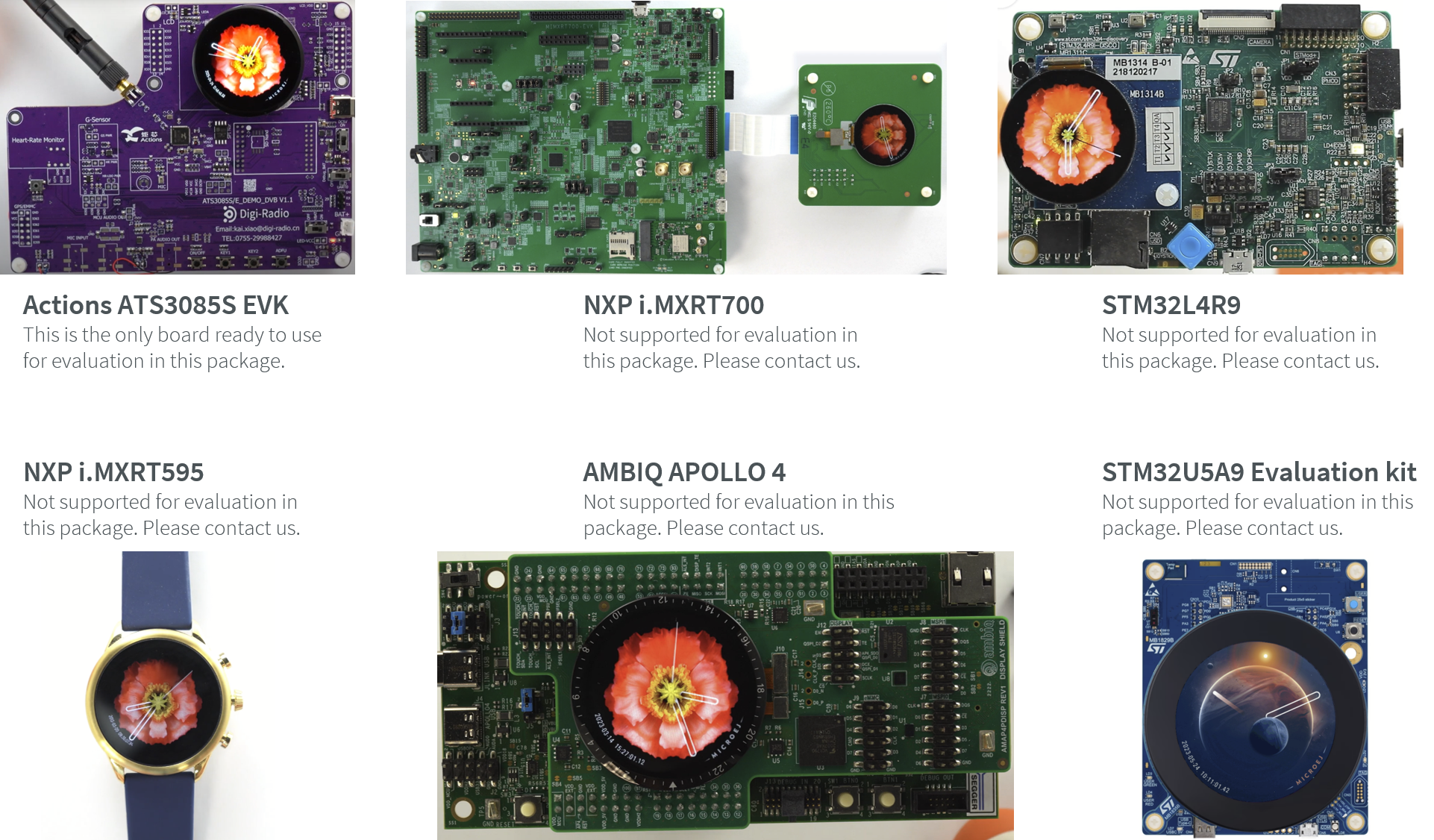
Supported Hardware
The Hardware Setup section provides detailed instructions on setting up the Actions ATS3085S EVK board.
If you would like to evaluate this package on another board, please contact support@microej.com.
Licensing
The repository of this package is a set of modules distributed under various software licenses, including the SDK EULA and the Commercial Component License for some of them.
Please consult the LICENSE.txt file attached to each module.